


Xiaomi Robot Vacuum 6
VAT included.
In stock
The Xiaomi Robot Vacuum 6 is a robot vacuum with mopping function that's just 9 cm tall. That means it fits under beds, sofas and cabinets, exactly where most of the dust gathers. To get over thresholds up to 4 cm, two mechanical legs lift it up.
With 30,000 Pa of suction power, you'll pull crumbs and pet hair out of carpet too. Mopping is done with a roller mop that's rinsed continuously while it cleans, while a scraper removes the dirty water right away. On carpet the mop lifts 10 mm, so your rug stays dry.
After every job, the station washes the roller mop with water up to 80 °C and dries it with hot air. That keeps the roller fresh and prevents any musty smell. The dust ends up in a bag that lasts up to 75 days. Every now and then you just top up with clean water.
Your payment details are processed securely. We do not store credit card information and have no access to this data.
Share This Product


A tour around your home
From the living room to along the baseboards, and then back to the station.

When you're not there
Schedule a set time in the Xiaomi Home app or start a cleaning run remotely. The robot then cleans while you're away, or at night while everyone's asleep.

Along the skirting boards
At walls and furniture legs, the side brush and the roller mop extend outward. This way, the edges get vacuumed and mopped too.

The rug in the living room
An ultrasonic sensor detects carpet. The roller mop then lifts 10 mm, so your rug stays dry.

Back to the station
There the roller mop is washed with water up to 80 °C and dried with hot air. The dust goes into a bag that lasts up to 75 days.

Is the Xiaomi Robot Vacuum 6 a good fit for your situation?
A great choice if:
- you have a lot of furniture with little space underneath, like beds, sofas and low cabinets
- there are thresholds or steps up to 4 cm in your home
- you have a mix of hard floors and rugs
- you want to leave washing the mop and emptying the dustbin to the station
Less suitable if:
- you want the robot to also recognize stains and adjust its approach accordingly. The Xiaomi Robot Vacuum 6 Pro does this with three cameras
- you mainly have high-pile carpet with a pile height above 8 mm
- you only want to vacuum and don't need a mopping function
Torn between the Robot Vacuum 6, 6 Pro and 6 Max? Here you can see them side by side.

Flat enough to fit under the bed
Under the bed and behind the sofa you'll often find more dust than on the rest of the floor, precisely because those spots are so hard to reach. The Xiaomi Robot Vacuum 6 is just 9 cm tall and simply drives right underneath.
That applies to most beds, sofas and low cabinets. Not sure? Just measure the clearance under your furniture. If there's more than 9 cm between the floor and the bottom, the robot will fit underneath.
Spots it doesn't need to reach, like the play corner or the cat's food bowl, you can block off in the Xiaomi Home app with a no-go zone. That way the robot stays away wherever you want it to.

Over the threshold into the bathroom and onto the balcony
The front-facing camera spots a threshold coming up. Two mechanical legs under the robot then lift it up. That's how the Robot Vacuum 6 gets over thresholds and steps up to 4 cm.
This lets it drive right through to the kitchen, the bathroom or the balcony. You don't need ramps, and you don't have to carry it over either.
Many robot vacuums already stop at around 2 cm. If you have higher thresholds at home, the Xiaomi Robot Vacuum 6 Max with climbing legs up to 6 cm is the better choice.
How does the Xiaomi Robot Vacuum 6 compare?
Three models, one series. The 6 has the same suction power as the 6 Pro, a roller mop and a station that washes and dries itself. The Pro and the Max have three cameras and also detect stains.
|
Model
|
Robot Vacuum 6 |
||
|
Suction Power
|
30,000 Pa |
30,000 Pa |
35,000 Pa |
|
Thresholds
|
Up to 4 cm |
Up to 4 cm (3 + 1 cm) |
Up to 6 cm, with climbing legs |
|
Under furniture
|
From 9 cm high |
From 9.3 cm |
From 9.3 cm |
|
Mopping
|
Roller mop, 3 water levels |
Roller mop, 16 nozzles |
Roller mop, 16 nozzles |
|
Obstacle Detection
|
AI camera, 220+ obstacles |
3 cameras, 320+ obstacles and stains |
3 cameras, 320+ obstacles and stains |
|
Clean the rollermop
|
80 °C, hot air drying |
85 °C, drying at 50 °C |
85 °C, drying at 50 °C |
|
Dust bag
|
75 days |
75 days |
75 days |
|
Battery
|
5,200 mAh |
5,200 mAh |
6,400 mAh |


The station handles the maintenance
After every cleaning session, the station washes the roller mop with water up to 80 °C. That also dissolves dirt that got stuck in the roller. Then hot air dries the mop in about two hours, so it stays fresh and there's no musty smell.
The dust bin is automatically emptied into a dust bag that seals itself and lasts up to 75 days. The 4-liter clean water tank is good for about 300 m² of mopping.
What's left for you to do: top up clean water now and then, empty the dirty water tank and replace the dust bag about once every two months. The station handles the rest itself.

Mopping with running water
Instead of a static cloth, the Robot Vacuum 6 uses a roller mop that spins across the floor with constant pressure, about 220 times per minute. While mopping, the roller is continuously rinsed, and a built-in scraper removes the dirty water right away.
So you mop the entire route with a clean roller, and dirt from the kitchen doesn't end up in the bedroom. The roller even loosens caked-on stains.
In the app, you choose from three water levels. On laminate you mop sparingly, on tiles you can go a bit wetter. Along baseboards and furniture legs, the roller mop extends outward, just like the side brush, so the edges get cleaned too.
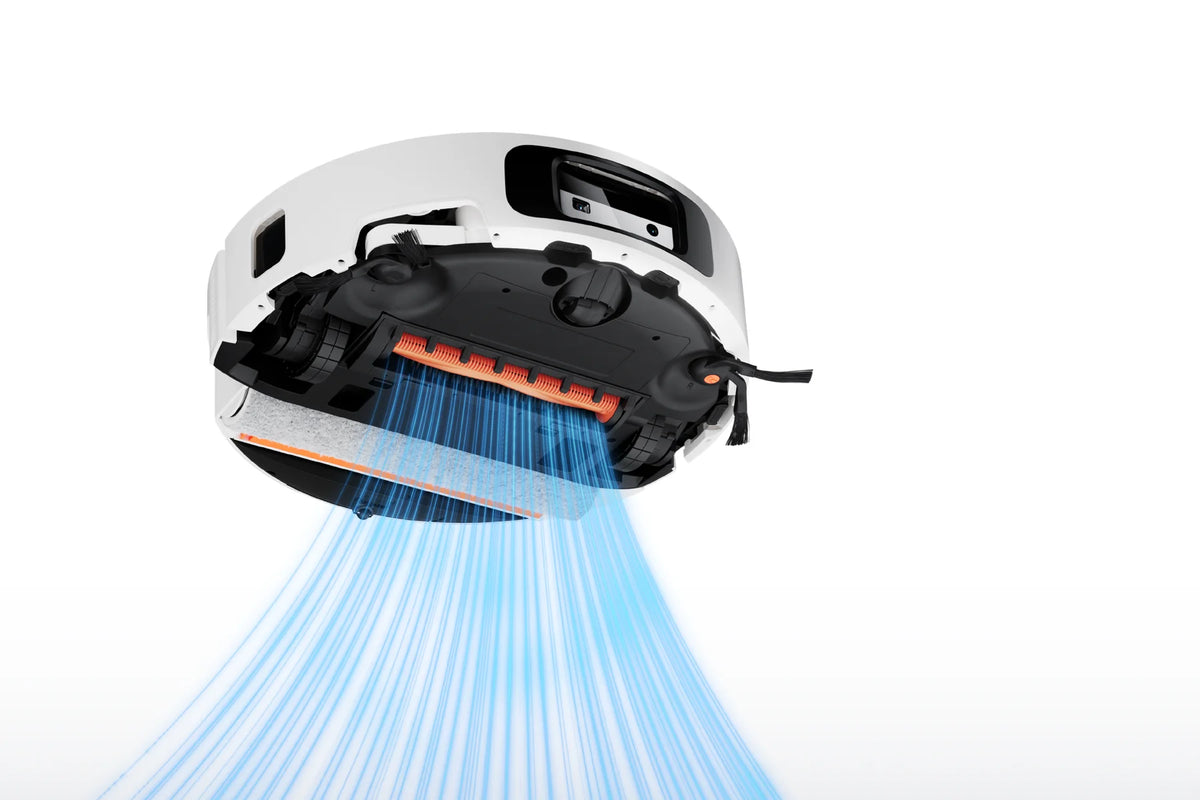
Suction power that handles carpet
With 30,000 Pa, the Robot Vacuum 6 pulls sand, crumbs and pet hair out of carpet and even from the seams in your floor. That's the same suction power as the 6 Pro.
Hair doesn't get wrapped around the brushes. The main brush has two blades that cut through hair instantly, and the side brush is shaped so that hair slides right off. That saves you the weekly fiddling with a pair of scissors.
An ultrasonic sensor detects carpet. On a rug, the roller mop lifts 10 mm, and with carpet boost on, the robot switches to full power there. Got high-pile carpet thicker than 8 mm? Then select carpet avoidance in the app.
How to set up the Xiaomi Robot Vacuum 6
Unpack it, set it down and open the app. A few handy features are switched off by default. Go through these steps once, and the robot will learn your home and know what matters to you.
Step 1: place the station in a fixed spot
Step 1: place the station in a fixed spot
Choose a spot against a straight wall, with open space in front of and beside the dock. This makes it easy for the robot to drive in and out. Connect the dock, fill the clean water tank and let the robot charge fully before its first run.
Step 2: connect the robot to the Xiaomi Home app
Step 2: connect the robot to the Xiaomi Home app
Download the Xiaomi Home app, log in and add the robot. You do all the settings below in that app. Afterwards, you can also control the robot with Google Assistant or Amazon Alexa.
Step 3: let it do a mapping run
Step 3: let it do a mapping run
Open your interior doors and tidy away loose cables and clothing. Then let the robot explore your whole home once. After that, the map will appear in the app, and you can draw no-go zones, for example around the play corner or your cat's food bowl.
Step 4: turn on AI recognition
Step 4: turn on AI recognition
This feature is turned off by default. You'll find it in the app under Settings, below AI Recognition. Without this feature, the camera won't detect shoes, cables and other obstacles.
Step 5: turn on the carpet boost
Step 5: turn on the carpet boost
This is only possible after the first cleaning cycle, once the robot has found your rugs. In the app, tap the carpet on the map and enable the carpet boost under the carpet settings. After that, it automatically switches to full power when it reaches a rug.
Step 6: set high-pile carpet
Step 6: set high-pile carpet
Do you have carpet with a pile height over 8 mm? Then set the robot to avoid that carpet while mopping. Regular rugs are no problem: the roller mop lifts 10 mm above those.
Step 7: choose the water level per floor
Step 7: choose the water level per floor
There are three water levels. Use the lowest on laminate and parquet, so they don't get too wet. On tiles and vinyl you can go one level higher.

Recognizes what's on the floor
The front-facing camera uses AI to recognize over 220 types of obstacles, from shoes to the scale still sitting in the bathroom. A charging cable or sock gets avoided instead of swallowed up.
That way the robot finishes its route, even when you're not home, and you don't have to tidy up the floor first. Note: AI recognition is turned off by default. Switch it on in the app after setup.
Through the Xiaomi Home app you can schedule a set time or start a cleaning session wherever you are. So the robot cleans while you're away, or at night while everyone's asleep. You can also control it with your voice, via Alexa or Google Assistant.

Service just as important as the product
We think service matters just as much as the product itself. Our customer service team knows every product inside and out and has tested them personally, so you always get honest, expert advice. We also run our warehouse entirely in-house.
Everything happens under our own roof. That way we keep a firm grip on quality and get your order to you quickly and carefully.
Order before 8:00 PM on a business day and if the product is in stock, you'll have it the next business day in the Netherlands and Belgium.
Why choose TechPunt?

Free shipping
All orders over €75 are delivered to your home at no extra cost.

Easy Returns
Enjoy the freedom of worry-free shopping thanks to our simple return policy.

Expert Advice
Our team tests every product themselves, so you always get honest and independent advice.
FAQ about the Xiaomi Robot Vacuum 6
Everything you want to know before you order. Can't find your question here? Our customer service is happy to help you.
How does the Xiaomi Robot Vacuum 6 handle high thresholds?
How does the Xiaomi Robot Vacuum 6 handle high thresholds?
Thresholds and small steps up to 4 cm. Two mechanical legs lift it right over them, so you won't need any ramps. If you have higher thresholds, take a look at the Xiaomi Robot Vacuum 6 Max, which climbs over obstacles up to 6 cm with its climbing legs.
Does the Xiaomi Robot Vacuum 6 fit under my couch?
Does the Xiaomi Robot Vacuum 6 fit under my couch?
The robot is 9 cm high. If there's more than 9 cm of free space under your sofa, bed or cabinet, it'll drive right under it. Areas where it shouldn't go can be blocked off with a no-go zone in the app.
What's the difference between the Xiaomi Robot Vacuum 6 and the 6 Pro?
What's the difference between the Xiaomi Robot Vacuum 6 and the 6 Pro?
The suction power is the same: 30,000 Pa. The 6 Pro has three cameras instead of one and recognizes not only obstacles but also 47 types of stains. Its roller mop has 16 water outlets and the station washes at 85 °C instead of 80 °C. The 6 is lower and clears thresholds up to 4 cm in one go.
Is the Xiaomi Robot Vacuum 6 suitable for pets?
Is the Xiaomi Robot Vacuum 6 suitable for pets?
Yes. The main brush cuts hair instead of letting it get tangled, and with 30,000 Pa it pulls hair out of carpets too. The camera steers around scattered toys and cables. You can keep the food bowl clear with a no-go zone in the app.
Will my carpet get wet when the Robot Vacuum 6 mops?
Will my carpet get wet when the Robot Vacuum 6 mops?
No. An ultrasonic sensor detects carpet, and the roller mop then lifts up by 10 mm. If you have high-pile carpet of more than 8 mm, select carpet avoidance during mopping in the app.
How often should you replace the dust bag?
How often should you replace the dust bag?
The dust bag lasts up to 75 days, so about once every two months. The 4-litre clean water tank is good for mopping around 300 m². The station washes and dries the roller mop all by itself.
Is the camera on the Xiaomi Robot Vacuum 6 safe for my privacy?
Is the camera on the Xiaomi Robot Vacuum 6 safe for my privacy?
AI recognition is off by default, so you only turn it on if you want to. The robot has been tested by TÜV SÜD according to the European standard for the cybersecurity of smart devices (ETSI EN 303 645).
Can you control the Xiaomi Robot Vacuum 6 with your voice?
Can you control the Xiaomi Robot Vacuum 6 with your voice?
Yes, via Google Assistant or Amazon Alexa. You'll need a device with one of those assistants, though. Beyond that, you simply control the robot through the Xiaomi Home app.


